Patient Hub

On this page

Patient Hub is a secure online portal where you can tell us if you still need your outpatient appointment, update your contact details, and let us know if you are currently unable to attend. This will help us keep our waiting lists accurate and up-to-date.

It can be accessed using a smartphone, tablet or computer.

Patient Hub

Important: Contact

For system support or to update your information, please contact us:

If emailing us to update your current information, please include the following information:

  • your full name
  • date of birth
  • address and postcode
  • phone number
  • CHI number (if known)

What do I need to do?

NHS Highland will create a Patient Hub account for you once you have been referred to one of our hospitals and have been waiting a specified number of weeks for an appointment.

When an account has been created for you, you will receive a text from:

nhsscotland

...and/or an email from Patient Hub:

nhsh.patienthub@nhsh.nhs.scot

...saying:

**Important message from NHS Highland, action required**

...and asking you to follow a secure link.

If you have received a text and/or email from us and you do not want to use the link contained within this notification you can alternatively:

access Patient Hub here

Please login as soon as possible (within 48 hours) after a notification, to avoid getting further notifications and to save us sending you a letter in the post.

When you have logged in, please respond to any outstanding notifications.

Please make sure we have your correct contact details: mobile number and/or email address.

Patient Hub - making things easier (video)

Questions about waiting list management within Patient Hub

Patient Hub is a secure online portal that allows you to engage with us about your place on the waiting list and keep your information up to date.

If you're waiting for an appointment at an NHS Highland hospital, you'll automatically receive a text and/or email asking you to confirm whether you still need the appointment now, at a future date, or not at all.

You'll only be contacted when you've been waiting for a specified number of weeks - this will be different for every specialty.

Do I need to create a Patient Hub account?

No, NHS Highland will create the account for you when you have been on one of our waiting lists for a specified number of weeks.

How do I access my Patient Hub account?

NHS Highland will send you a link by text message or email. You can use that link or the button on this page to access your account. Once you have used this link you must follow the steps below:

  1. If you have trouble accessing the page, please check your internet access and that you are using one of these compatible web browsers:
    • Microsoft Edge
    • Google Chrome
    • Mozilla Firefox
    • Apple Safari
    • Chrome for Android
    • Chrome for iOS
    • Safari for iOS
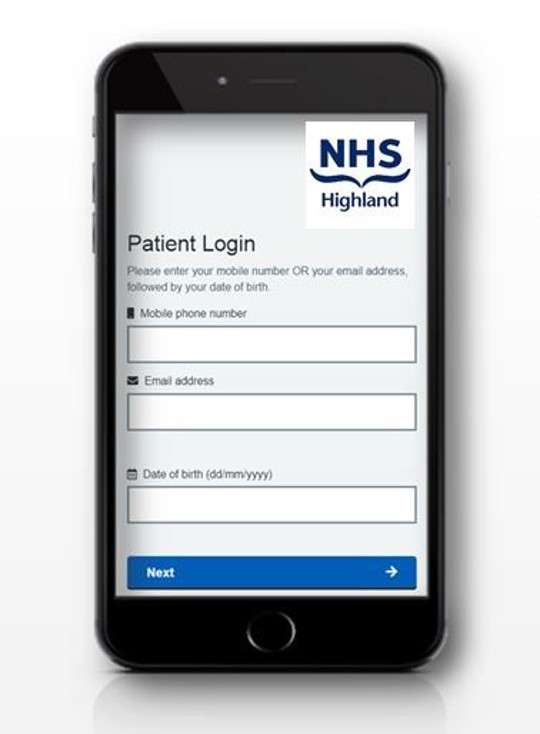
  2. You will be taken to the login page.
  3. You’ll be asked to enter either your mobile number or email address, together with your date of birth. Please enter your date of birth in the format DD/MM/YYYY
  4. You will then be sent a 6-digit authentication code by text, or by email if we don’t have your mobile number.
  5. Enter the 6-digit code. Please be aware the authentication code will expire in 2 minutes and 30 seconds. When the time limit expires a new code is required.

How do I access Patient Hub at another time?

You can use the link in the text message and/or email you received. The link to your account will stay the same, so you can go back to any text message or email. Every time you receive a notification you will get a reminder of the link.

You can also access Patient Hub at any time using this link.

Do I need to download the Patient Hub as an app from an app store?

No, there is no need to download anything.

When NHS Highland sends you the first notification you will be sent a link. The Patient Hub is a web page that you can access at any time. For easy future access, you may want to save this link as a favourite. Each time you sign in, you will also be sent a new 6-digit security code.

Is Patient Hub secure?

Yes, Patient Hub is designed with security in mind.

Patient Hub uses two factor authentication. You begin the login process by giving us some personal information known to you: your mobile number or email address, and your date of birth. To complete the log in process, you will be sent a 6-digit security code by text message, or by email. This code can only be used once. The next time you log in, you will get a new 6-digit code.

Do I need to remember a username and password?

No, you do not have a username or password.

How long do I have to respond to the text message or email?

Please respond to the notification within 48 hours.

What happens if I do not respond to the notification or authentication code I receive?

If you do not respond you will be sent two reminders, each 48 hours apart.

If you do not respond to any of the text messages and/or emails then you will be sent a letter in the post.

When do I receive a notification?

You will receive a notification when you have been on one of NHS Highland's waiting lists for a specified number of weeks.

You may receive up to three text messages or emails inviting you to login and respond. If you log in after the initial notification, the system will not send you any further text messages or emails regarding the referral.

What if I don’t have a smart phone? Or a computer?

The secure link requires a smart phone, tablet or a computer to access it. If you do not have a smart phone, you can receive the link and authentication code in an email.

If you don’t have a smart phone or computer, don’t worry - we will continue to contact you via telephone or letter.

What happens if I want to opt out of using Patient Hub, or still want to receive a letter in the post?

You can access the link to opt out of future communications on Patient Hub, or contact the Patient Hub team who can do this for you.

Why would I want to use Patient Hub?

Patients are used to using digital portals in their everyday lives. This will allow you to quickly and easily communicate with NHS Highland at a time that is convenient to you.

What are the benefits of the waiting list management system?

Waiting lists for appointments continue to grow. The waiting list management system will allow you the opportunity to contact us digitally, and confirm whether you still need an appointment.

This has a number of benefits overall:

  • Patients who still require care are able to access appointments sooner, as waiting lists are kept up to date and no longer include people who no longer need treatment.
  • Patients are less likely to miss appointments they no longer need, avoiding unnecessary travel, disruption, and time away from work, family, or other commitments.
  • Patients can be offered appointments more quickly when capacity becomes available, helping them progress through their care pathway without unnecessary delays.
  • Patients can be confident that waiting list information is accurate and up to date, supporting fair and effective management of access to care.

How do I respond?

Once logged in you will be able to see any referrals awaiting a response, by selecting the referrals tab. For each referral you will be asked to select an option that best describes your situation, for example:

  • “I no longer want an appointment”
  • “I no longer require an appointment as my condition has improved / resolved”
  • “I no longer require an appointment as I have received private treatment for my condition”
  • “I still require an appointment but I am unavailable between *patient selects dates*”
  • “I still require an appointment”

What happens with your response?

Patient responses will be automatically uploaded into the online portal in real-time. This will be managed centrally at Raigmore Hospital by a dedicated team. Each response will generate a different action:

  • “I no longer want an appointment” or “I no longer require an appointment” - you will be removed from the waiting list and a letter sent to your GP informing them that you have been removed from the waiting list.
  • “I still require an appointment but I am unavailable between *patient selects dates*” - you will remain on our waiting list and a period of unavailability will be added to your record. You will receive an appointment offer in due course within the dates that you have told us you are available.
  • “I still require this appointment” - no action required. You will remain on our waiting list and you will receive an appointment offer in due course.

Will my GP be informed if I am removed from the waiting list?

Yes, a letter will be sent to your GP informing them that you have been removed from the waiting list.

Last updated: 1 July 2026

Next review date: 27 June 2027